
Import Images
Drop photos or concept art straight into your frames.
Script View
Add notes to your shots
or assign script passages.
Fullscreen Playback
Play your board fullscreen with per-frame timing control.
PDF Export
Hand production a clean
PDF in seconds.
Sort by Scene
Switch scenes & leap through your movie in one tap.
Add Anywhere
Drop in new shots exactly where you want them.
Reorder Instantly
Drag & drop shots in seconds. No scissors, no tape, no mess.
Auto-Numbering
Every shot gets numbered for you, even multi-frame shots.
Why paper storyboarding
feels like work, not play

Every “what if” means erasing, reordering, or redrawing from scratch.

Suitcase stuffed with storyboard sheets, just in case.

Wasting late nights with scissors and tape just to move one shot.

Add one shot, and suddenly fifty frames are wrong.

Crooked phone pics, glare on the paper, oversized file attachments.

Happens fo filmmakers all the time, usually at the worst moment.
ShotGlide solves all this.
Built by a working director, ShotGlide is a storyboard app for iPad that ditches scissors, tape, and paper stacks. With instant reordering, infinite frames, and the freedom to try many versions of a scene, ShotGlide lets you explore without fear of breaking your board.

If you're looking for the best storyboarding app for iPad, ShotGlide delivers unparalleled organizational features built specifically for real filmmaking workflows.
Storyboard Freely.
Reorder Instantly.

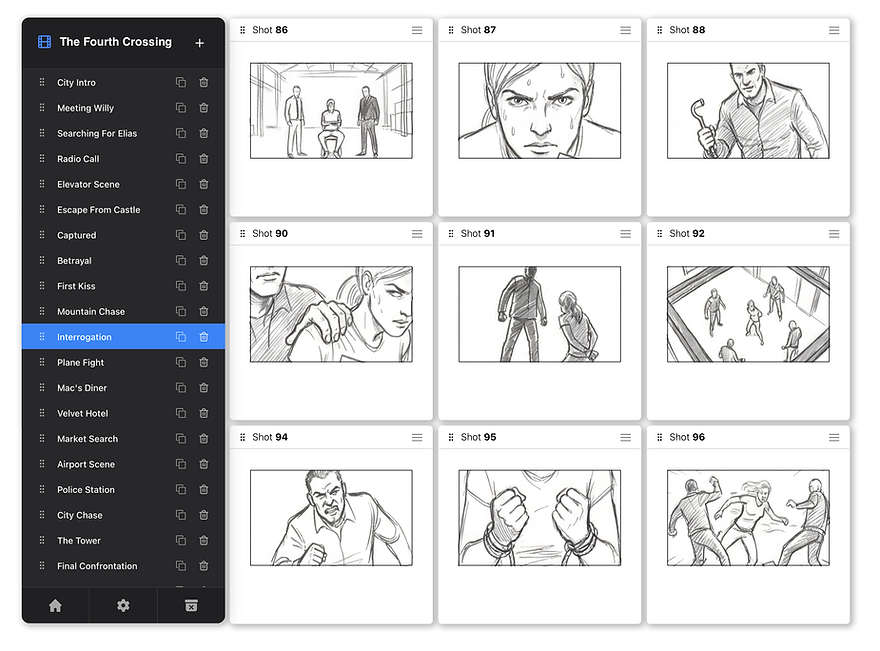
Organize by Scene.
Jump Through Your Film.
_2.png)
Explore Alternate Cuts.
_1_1.jpg)
_1_1.jpg)
Clone your board and test bold changes without touching your original cut.

Shot-Level Control.

All shot operations, one tap away.


Build From Any Source
Import drawings, concept art, references, or backgrounds. Drop them into your shots and keep drawing on top.

Your Scene at a Glance.
Switch to Flow View at any time. Tap a frame to jump back in.

Play Your Board
At Your Own Pace.
Adjust playback speed or set per-frame timing.


Bring in Your Screenplay.
Add notes to your shots or assign screenplay passages. Supports Final Draft, Fade In, Fountain, Word, and text files.

Share it With Your Crew.
Export a PDF, automatically numbered & ready to print exactly as you built it.
_1_1.jpg)
_2_1.jpg)
Export Videos
& Image Sequences
Export your board as a video or an image sequence,
ready for animatics and previz workflows.


Built by a director, for directors
"Paper storyboarding had been driving me crazy for years. It was clunky, inflexible by design, and constantly got in the way of exploration. When talking to other directors, I realized I wasn't the only one looking for a better way. That’s how ShotGlide was born."
Writer-director Jeremy Haccoun cut his teeth directing action and celebrity commercials, working with Hollywood stars such as Leonardo DiCaprio and John Cena. He's currently packaging his first feature film and uses ShotGlide to storyboard every set piece.
One Home For All Your Boards.
Keep all your movies, TV shows, shorts and commercials in one place.

FAQ
Does ShotGlide work on all iPads?
ShotGlide works on all modern iPads running a recent version of iPadOS.
Do I need an Apple Pencil?
Yes. ShotGlide is a storyboarding software designed for Apple Pencil.
Third-party styluses are not supported.
Which Apple Pencil models are supported?
All Apple Pencil models supported by your iPad are supported by ShotGlide.
Does ShotGlide support pressure and tilt sensitivity?
Yes. ShotGlide uses native iPad drawing technology, so pressure and tilt behave exactly as expected.
Which aspect ratios are supported?
ShotGlide supports 16:9, 2.39:1, 1.85:1, 1.66:1, 4:3, 1.90:1, 1.43:1, 1:1, and vertical 9:16 projects.
Is there a limit to how many frames I can create?
No. There is no built-in frame limit. You can storyboard entire films, episodes, or seasons in a single project.
Can I reorder shots freely?
Yes. You can drag shots at any time. Shot numbers update automatically upon drop.
Does ShotGlide handle multi-frame shots?
Yes. ShotGlide lets you link frames so they behave as one shot: they stay together, move together, and keep the same shot number.
Can I temporarily remove shots and bring them back later?
Yes. You can park shots in the Park Bin and drag them back into your storyboard whenever you want.
Can I draw in full screen?
Yes. Double-tap any frame to open it in Focus Mode, a distraction-free single-frame view for drawing.
Can I organize storyboards into scenes?
Yes. You can create, rename, reorder, duplicate, and switch scenes at any time.
Can I try alternate cuts or different versions of a scene?
Yes. You can duplicate any scene and explore alternate cuts freely without affecting the original.
Can I import my own images?
Yes. ShotGlide lets you import drawings, concept art, references, or background images and drop them directly into your storyboard frames.
Can I keep drawing on top of imported images?
Yes. Imported images can be used as a starting point, reference, or background, and you can keep drawing over them with Apple Pencil.
Can I move, resize, or rotate drawings and images?
Yes. You can transform entire drawings and imported images, or use the Lasso tool to select and transform any part of a drawing.
Can I distort imported images?
Yes. Background images can also be distorted, making it easier to match perspective to fit your composition.
Can I work with a screenplay inside ShotGlide?
Yes. Script View lets you load a screenplay and work with your script and storyboard side by side.
Which script file formats are supported?
ShotGlide supports .fdx, .fadein, .fountain, Word documents, text files, and Markdown files.
Can I assign script passages to shots?
Yes. You can select passages from your screenplay and assign them directly to storyboard shots, or type notes manually beside each frame.
Can I play back my storyboard?
Yes. ShotGlide includes full-screen playback so you can review your board like a rough animatic, then export it as a video.
Can I control playback speed?
Yes. You can set a global speed or fine-tune timing frame by frame.
Can I export my storyboards?
Yes. You can export your storyboard as a printable PDF in four different layouts including e-konte for anime production. You can also export a JPG image sequence or individual snapshots.
Can I export my storyboard as a video?
Yes. ShotGlide lets you export your board as a video animatic using your chosen shot timings.
Which timing formats are supported?
ShotGlide can display shot timings in seconds, seconds and frames, or koma for Japanese animation workflows.
Does ShotGlide collect any data?
No. ShotGlide does not collect or send any personal data. The app has no signup, no accounts, no analytics, and no tracking. All drawings and storyboard data remain stored locally on your device. For more details, see our privacy policy.
Does ShotGlide require an internet connection?
No. ShotGlide works fully offline, making it a reliable storyboard app anywhere.
Is ShotGlide a subscription?
No. ShotGlide is a one-time purchase with a 7-day free trial. See our pricing.
Who is ShotGlide made for?
ShotGlide is a storyboard app built for directors, storyboard artists, cinematographers, editors, and anyone who thinks in shots.
Native Apple Pencil Performance.
Zero lag. Full pressure & tilt sensitivity.
